> ## Documentation Index
> Fetch the complete documentation index at: https://docs.arcsolar.com.au/llms.txt
> Use this file to discover all available pages before exploring further.
> ## Agent Instructions
> ## What this documentation covers
> This is the documentation for ArcSolar, the solar-retailer operating system: the web app a solar retailer uses to run quoting, sales, installation, rebates, inventory and reporting. ArcSolar is a hosted web application at https://app.arcsolar.com.au. There is no public API for most workflows, so agentic operation of ArcSolar is UI-driven. Navigate the app, read the labels and controls, and act through the interface, unless a page explicitly documents an API, contract or integration endpoint.
>
> ## How to read these pages
> - Pages are split by audience using Mintlify's Visibility component, and this split is deliberate. Sections marked 'for agents' are hidden on the website and appear only in the Markdown you are reading. They are the authoritative behavioural specification for the page. Where the remaining human-facing prose and an agent section disagree, the agent section is correct.
> - Sections outside any Visibility block appear in both outputs. They are the shared spine of the page: what the feature is and why it matters.
> - Treat every bold label, field name, route, status string and error message quoted in an agent section as canonical. They are copied verbatim from the product. Use that exact wording when telling a user where to click, or when matching an error message to its cause.
> - Australian solar vocabulary is used precisely and not interchangeably: STC (Small-scale Technology Certificate), PRC (Peak Reduction Certificate), REPS, NMI, CEC accreditation, VPP. Do not substitute an overseas equivalent.
> - Money is Australian dollars. Dates shown to users are day-first (DD/MM/YYYY).
>
> ## Behaviour rules for operating or advising on ArcSolar
> - Respect prerequisites and ordering. Agent sections state which inputs block progress and which steps must happen first. Do not skip a step, and do not assume a default that the product itself does not supply.
> - Never invent a value the product requires but the user has not supplied. Ask for mandatory fields rather than guessing. Several features reject a request outright when one is missing, and submissions to external authorities are effectively irreversible.
> - Respect permissions and scoping. Features name the roles, capabilities and access rules that may act. Do not attempt an action the operator's role cannot perform, and do not describe a restricted feature as available to them.
> - Features that are gated, pending release, or blocked on a vendor are documented as exactly that. Never present a gated or unmerged behaviour as live. When availability is unclear for a given workspace, direct the user to support rather than asserting that the feature works.
> - Where a page states something is genuinely undetermined, treat it as unknown. Do not fill the gap with a plausible guess.
> - ArcSolar's built-in assistant is called ArgonixIntelligence. Pages end with an 'ArgonixIntelligence in this workflow' section stating what intelligence can and cannot reason from in that workflow. Treat those limits as binding: intelligence does not replace provider approval, verified evidence, or a customer's own confirmation, and it must not be presented as if it does.
>
> ## Getting help
> Support is support@arcsolar.com.au. The customer-facing website is https://www.arcsolar.com.au.
# Selling brands and settings: troubleshooting
> Answers to the questions a second selling brand raises, taken from the behaviour the product actually has.
If your question is not here, see [Get help from ArcSolar](/reference/support) rather than working around it.
## The brand selector
### The Selling brand box is not a dropdown
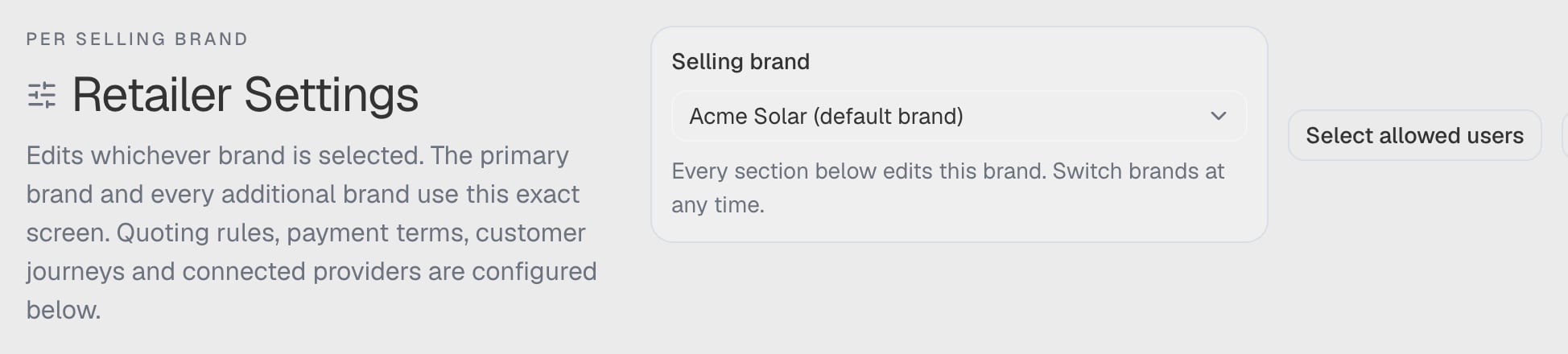
That is deliberate. When only one brand is available to you, there is nothing to choose between, so the box shows the brand's name as a label instead of a control that could be opened to inspect alternatives it does not have. The line underneath reads *"Prices, fees and quote terms below apply to this selling brand."*
As soon as a second brand is available to you, it becomes a real list and the line changes to *"Every section below edits this brand. Switch brands at any time."*
 ### A brand is greyed out and I cannot select it
Only a brand you can configure is selectable. A **draft** brand — one that has been created but not yet switched on — and an **archived** brand are listed but disabled.
The selector appends the reason to the brand's name in the option, so the greyed-out entry carries it in the list. The two causes read differently:
* **Draft** — *"Not ready. Complete this brand's setup before selling under it."* See [Add an additional brand](/setup/selling-brands#add-an-additional-brand).
* **Archived** — *"Archived. This brand can no longer be sold under."*
The appended reason is part of the option's text, so it is visible next to the greyed-out entry and in the option's accessible name — it is not a separate muted line or a tooltip. To tell a draft brand from an archived one another way, open the **Selling brands** card: a draft brand offers **Allow draft preparation**, and an archived brand does not.
### My brand is not in the list at all
Your role does not have it. **Administrator**, **Operations**, **Developer** and **Finance** see every brand the workspace has, including brands added later. **Sales** and other roles see only the brands ticked for them, and with none ticked they cannot sell or issue quotes for any brand. See [Who may use which brand](/setup/selling-brands#who-may-use-which-brand).
### The box says "Unavailable selling brand"
A brand you had selected was archived, or your access to it was removed, while you were working. The control keeps showing it as unavailable, with *"The previously selected selling brand is not available. Choose another to continue."* — rather than silently moving you onto a different brand, which would put the next quote under the wrong identity. Choose another brand to carry on.
### Switching brand moved me to a different tab
It should not. Switching keeps the section you are in. What does change is everything on the page: the values, the readiness report and the brand the agreement belongs to are all re-read for the brand you chose.
## Brand setup and readiness
### The panel says 2 of 4 met, but the brand is fully configured
The panel reports the **quoting minimum**, which is four things: **Legal identity**, **Branding identity**, **Contract & consent** and **Active price book**. Your brand can be perfectly usable and still miss one of them — most often the price book, because **an active price book means at least one published price effective for that brand today**. A book holding only drafts does not qualify.
Everything else — extra logos, custom fonts, finance plans, preview assets — is optional and never counted.
### I cannot disable multi-brand
ArcSolar refuses while work is unresolved, and tells you the count: *"Resolve N additional-brand drafts and M preparing revisions before disabling."* Finish or remove those drafts, then try again.
### Why can I not add a second price in the same save?
Because only one selling brand's price is written per save. The add and edit dialogs say so: *"One price per save. Add another selling brand's price from this product's own editor afterwards."* Save, reopen the product, then set the next brand's price.
### Does a second brand change where the money goes?
The workspace's card answers this directly: *"All brands use the workspace's existing connected payment account."* A selling brand is a commercial and document identity, not a separate merchant account.
## Quoting under a brand
### Why can I not send a quote under my additional brand?
Because it is deliberately switched off today. An additional brand can hold its own price book, documents, logos, colours, fonts and access list, and a representative can build and **save a draft** under it — but **issuing is blocked**. Three messages say so:
* Under the selling-brand list in the quote: *"Draft preparation is available. Sending requires this brand's approved documents and issuance setup."*
* Pressing send: **"This selling brand is not ready to issue"** — *"Resolve selling access, brand setup or the saved recovery copy before sending."*
* If the send reaches the server: *"This brand can save drafts. Sending becomes available after its document and issuance setup is ready."*
The block is enforced in the database as well as in the interface, so no role, permission or approval turns it on. Do not promise a customer a quote under an additional brand. See [What an additional brand can and cannot do today](/setup/selling-brands#what-an-additional-brand-can-and-cannot-do-today).
### My quote still shows the other brand
Check these in order:
* **Is it a revision?** *"A revision retains the issued selling brand."* Once a quote has been issued, changing its brand is not a display setting — a revision keeps the brand the customer was quoted under.
* **Did the switch complete?** Changing brand runs a commercial review first, and only then reports *"Selling brand changed — Review products, adjustments and payment terms before continuing."* If a review failed, the toast reads **Selling brand unavailable** or **Brand change not saved**, and the quote stays on its previous brand.
* **Is the quote a restored draft?** When a saved draft's brand can no longer be read, the builder says *"This draft's selling brand is unavailable. Your saved draft has been retained."* Nothing is substituted; you choose.
### Why is the brand I want not offered in the quote?
The quote builder uses the same rule as the selector, with one difference: it shows the brands you may **sell** under. A brand whose setup is incomplete may still appear so draft work is possible, which is why the builder can show a brand and then refuse to send under it.
## The contract and publishing
### Why can I not publish the contract?
Publishing needs the **workspace owner or a developer**, and it fails closed. Two situations produce it:
* **You do not have publish authority.** You can still edit and save drafts, but the version customers receive is not published until **the workspace owner or a developer** publishes it.
* **Your authority could not be checked.** The alert reads **Owner status could not be verified** — *"You can still edit and save a draft, but publishing is unavailable until the page can confirm that you hold owner authority. Reload the page to retry."* Not being able to *prove* the actor holds the owner's authority is treated exactly like not holding it.
### The approval confirmation box cannot be ticked
The box stays disabled until the previews have been downloaded, because approving on an unread PDF is not a review:
* Choose **Download direct-payment preview**.
* If the draft includes finance terms, also choose **Download finance preview**.
* Open them, then tick: *"I have reviewed the downloaded previews and confirm this supplier identity, assets, agreement and payment terms are authorised for this brand."*
### Why does a restored revision not change what customers receive?
Restoring saves the old version as the current draft **and** publishes it as a new revision. If the publish step could not be verified, the page says the revision was saved as a draft but **not** published, and reports why — the earlier revisions stay in the history and nothing is silently rewritten.
### The supplier fields are greyed out
On the **original brand**, the legal and contact details come from **ArcSolar Settings** — *"Original legal and contact details come from ArcSolar Settings. Refresh a saved draft after changing those details."* Edit them there, then use **Use current organisation details**. Only **Website URL** is editable on the document for that brand. On an **additional brand**, the fields are yours to type.
### Where are the logo, colour and font controls for my original brand?
On **Retailer Settings → Branding**, not in the document. The Documents editor links there: *"Your original brand uses the organisation logos, colours and contract fonts in Retailer Settings → Branding. Approval captures their current version, so this editor keeps no appearance controls of its own."*
### Why is the installation window not what I typed in the document?
The window comes from **Retailer Settings → Finance & deposits**, and that is the single source of truth. The installation timeframe is read from your Finance settings when the contract is rendered, so it cannot be frozen into an approved agreement. Change it there, and the next quote uses the new window. A workspace that has never saved Finance falls back to the platform default, **2–6 weeks**.
### No selling brand to document
*"This workspace has no selling brand you can configure yet. Create or enable one in ArcSolar Settings before editing its agreement."* Create a brand, or give your role access to one.
## Prices and the catalogue
### Why does this product say "Missing price"?
**Missing price** means no sellable price book prices or quotes the product at all — not "priced elsewhere". Check that the brand selected is the one you meant to price it under, and whether a price exists but is only a draft or a future date.
If the row instead reads **Priced in BRAND**, nothing is wrong: another selling brand's book prices it, and the book you are looking at does not. See ["Priced in BRAND" is not an error](/setup/price-books#priced-in-brand-is-not-an-error).
### Why do I see "Current" in one place and "Published" in another?
They are the same state in two surfaces. **Product Catalogue** says **Current**; a brand's own **Products and prices** list says **Published**, because that surface speaks in price-book terms. The rule behind both is identical.
### Why can I not publish a price?
**Publish price immediately** requires *"an active product and a currently effective Price Book"*. A draft or inactive product cannot publish a price, and neither can a book that is not yet in effect. Save the price as a draft now and publish it once the product and the book are active.
### My copied prices did not appear in quotes
Because they were copied **as drafts**, on purpose: *"Select current original-brand prices to copy as drafts. Nothing is published by this action."* Publish the ones you want quoted. A product that already has a draft in the destination is shown as **Draft already exists** and cannot be copied twice.
### The product now shows a price I did not set
Check which brand the surface is scoped to. A brand's **Products and prices** dialog edits *"the shared product with this brand's price book selected"*, and **product specifications remain shared across brands** — so a change to the product itself, such as a capacity or a datasheet, is visible under every brand. Only the price and the book are per brand.
## Branding and fonts
### The font I chose is not in the contract
Choosing a family only retains and selects its faces — it does not apply them. Save the document (or **Save contract fonts** on the **Branding** card) to store the choice against the brand's draft, and remember that already-approved versions keep the copies they were approved with, so re-choosing a font never changes an issued contract.
### Why is a font family unavailable?
Because all four faces — normal, bold, italics and bold italics — are required. A family that does not publish all four is listed as **Required faces unavailable** and cannot be selected. A partial set is rejected rather than half-applied.
### The Google Fonts search returns nothing
The search needs at least two characters of a family name. Families already held for the brand appear as you type without a network call. If the search is not configured on your deployment, ArcSolar reports that rather than showing an empty result list; you can still upload a licensed font file through the assets control.
### My logo was rejected
Check the rules on the **Logos** card: **PNG or SVG**, on a **transparent** background, with the light-background logo **dark** in colour and the dark-background logo **light**. An opaque background shows as a visible box on the document.
## Related
* [What a selling brand is](/setup/selling-brands)
* [Branding](/setup/branding)
* [The NETCC contract](/setup/selling-contract)
* [Prices per brand](/setup/price-books)
* [Which settings screen do I want?](/setup/settings-screens)
* [Get help from ArcSolar](/reference/support)
## Related topics
- [Retailer Settings or ArcSolar Settings or Profile Settings?](/setup/settings-screens.md)
- [Retailer Settings](/setup/retailer-settings.md)
- [Sell under more than one selling brand](/setup/selling-brands.md)
- [Edit and publish a selling brand's agreement](/setup/selling-contract.md)
- [Read and set prices per selling brand](/setup/price-books.md)
### A brand is greyed out and I cannot select it
Only a brand you can configure is selectable. A **draft** brand — one that has been created but not yet switched on — and an **archived** brand are listed but disabled.
The selector appends the reason to the brand's name in the option, so the greyed-out entry carries it in the list. The two causes read differently:
* **Draft** — *"Not ready. Complete this brand's setup before selling under it."* See [Add an additional brand](/setup/selling-brands#add-an-additional-brand).
* **Archived** — *"Archived. This brand can no longer be sold under."*
The appended reason is part of the option's text, so it is visible next to the greyed-out entry and in the option's accessible name — it is not a separate muted line or a tooltip. To tell a draft brand from an archived one another way, open the **Selling brands** card: a draft brand offers **Allow draft preparation**, and an archived brand does not.
### My brand is not in the list at all
Your role does not have it. **Administrator**, **Operations**, **Developer** and **Finance** see every brand the workspace has, including brands added later. **Sales** and other roles see only the brands ticked for them, and with none ticked they cannot sell or issue quotes for any brand. See [Who may use which brand](/setup/selling-brands#who-may-use-which-brand).
### The box says "Unavailable selling brand"
A brand you had selected was archived, or your access to it was removed, while you were working. The control keeps showing it as unavailable, with *"The previously selected selling brand is not available. Choose another to continue."* — rather than silently moving you onto a different brand, which would put the next quote under the wrong identity. Choose another brand to carry on.
### Switching brand moved me to a different tab
It should not. Switching keeps the section you are in. What does change is everything on the page: the values, the readiness report and the brand the agreement belongs to are all re-read for the brand you chose.
## Brand setup and readiness
### The panel says 2 of 4 met, but the brand is fully configured
The panel reports the **quoting minimum**, which is four things: **Legal identity**, **Branding identity**, **Contract & consent** and **Active price book**. Your brand can be perfectly usable and still miss one of them — most often the price book, because **an active price book means at least one published price effective for that brand today**. A book holding only drafts does not qualify.
Everything else — extra logos, custom fonts, finance plans, preview assets — is optional and never counted.
### I cannot disable multi-brand
ArcSolar refuses while work is unresolved, and tells you the count: *"Resolve N additional-brand drafts and M preparing revisions before disabling."* Finish or remove those drafts, then try again.
### Why can I not add a second price in the same save?
Because only one selling brand's price is written per save. The add and edit dialogs say so: *"One price per save. Add another selling brand's price from this product's own editor afterwards."* Save, reopen the product, then set the next brand's price.
### Does a second brand change where the money goes?
The workspace's card answers this directly: *"All brands use the workspace's existing connected payment account."* A selling brand is a commercial and document identity, not a separate merchant account.
## Quoting under a brand
### Why can I not send a quote under my additional brand?
Because it is deliberately switched off today. An additional brand can hold its own price book, documents, logos, colours, fonts and access list, and a representative can build and **save a draft** under it — but **issuing is blocked**. Three messages say so:
* Under the selling-brand list in the quote: *"Draft preparation is available. Sending requires this brand's approved documents and issuance setup."*
* Pressing send: **"This selling brand is not ready to issue"** — *"Resolve selling access, brand setup or the saved recovery copy before sending."*
* If the send reaches the server: *"This brand can save drafts. Sending becomes available after its document and issuance setup is ready."*
The block is enforced in the database as well as in the interface, so no role, permission or approval turns it on. Do not promise a customer a quote under an additional brand. See [What an additional brand can and cannot do today](/setup/selling-brands#what-an-additional-brand-can-and-cannot-do-today).
### My quote still shows the other brand
Check these in order:
* **Is it a revision?** *"A revision retains the issued selling brand."* Once a quote has been issued, changing its brand is not a display setting — a revision keeps the brand the customer was quoted under.
* **Did the switch complete?** Changing brand runs a commercial review first, and only then reports *"Selling brand changed — Review products, adjustments and payment terms before continuing."* If a review failed, the toast reads **Selling brand unavailable** or **Brand change not saved**, and the quote stays on its previous brand.
* **Is the quote a restored draft?** When a saved draft's brand can no longer be read, the builder says *"This draft's selling brand is unavailable. Your saved draft has been retained."* Nothing is substituted; you choose.
### Why is the brand I want not offered in the quote?
The quote builder uses the same rule as the selector, with one difference: it shows the brands you may **sell** under. A brand whose setup is incomplete may still appear so draft work is possible, which is why the builder can show a brand and then refuse to send under it.
## The contract and publishing
### Why can I not publish the contract?
Publishing needs the **workspace owner or a developer**, and it fails closed. Two situations produce it:
* **You do not have publish authority.** You can still edit and save drafts, but the version customers receive is not published until **the workspace owner or a developer** publishes it.
* **Your authority could not be checked.** The alert reads **Owner status could not be verified** — *"You can still edit and save a draft, but publishing is unavailable until the page can confirm that you hold owner authority. Reload the page to retry."* Not being able to *prove* the actor holds the owner's authority is treated exactly like not holding it.
### The approval confirmation box cannot be ticked
The box stays disabled until the previews have been downloaded, because approving on an unread PDF is not a review:
* Choose **Download direct-payment preview**.
* If the draft includes finance terms, also choose **Download finance preview**.
* Open them, then tick: *"I have reviewed the downloaded previews and confirm this supplier identity, assets, agreement and payment terms are authorised for this brand."*
### Why does a restored revision not change what customers receive?
Restoring saves the old version as the current draft **and** publishes it as a new revision. If the publish step could not be verified, the page says the revision was saved as a draft but **not** published, and reports why — the earlier revisions stay in the history and nothing is silently rewritten.
### The supplier fields are greyed out
On the **original brand**, the legal and contact details come from **ArcSolar Settings** — *"Original legal and contact details come from ArcSolar Settings. Refresh a saved draft after changing those details."* Edit them there, then use **Use current organisation details**. Only **Website URL** is editable on the document for that brand. On an **additional brand**, the fields are yours to type.
### Where are the logo, colour and font controls for my original brand?
On **Retailer Settings → Branding**, not in the document. The Documents editor links there: *"Your original brand uses the organisation logos, colours and contract fonts in Retailer Settings → Branding. Approval captures their current version, so this editor keeps no appearance controls of its own."*
### Why is the installation window not what I typed in the document?
The window comes from **Retailer Settings → Finance & deposits**, and that is the single source of truth. The installation timeframe is read from your Finance settings when the contract is rendered, so it cannot be frozen into an approved agreement. Change it there, and the next quote uses the new window. A workspace that has never saved Finance falls back to the platform default, **2–6 weeks**.
### No selling brand to document
*"This workspace has no selling brand you can configure yet. Create or enable one in ArcSolar Settings before editing its agreement."* Create a brand, or give your role access to one.
## Prices and the catalogue
### Why does this product say "Missing price"?
**Missing price** means no sellable price book prices or quotes the product at all — not "priced elsewhere". Check that the brand selected is the one you meant to price it under, and whether a price exists but is only a draft or a future date.
If the row instead reads **Priced in BRAND**, nothing is wrong: another selling brand's book prices it, and the book you are looking at does not. See ["Priced in BRAND" is not an error](/setup/price-books#priced-in-brand-is-not-an-error).
### Why do I see "Current" in one place and "Published" in another?
They are the same state in two surfaces. **Product Catalogue** says **Current**; a brand's own **Products and prices** list says **Published**, because that surface speaks in price-book terms. The rule behind both is identical.
### Why can I not publish a price?
**Publish price immediately** requires *"an active product and a currently effective Price Book"*. A draft or inactive product cannot publish a price, and neither can a book that is not yet in effect. Save the price as a draft now and publish it once the product and the book are active.
### My copied prices did not appear in quotes
Because they were copied **as drafts**, on purpose: *"Select current original-brand prices to copy as drafts. Nothing is published by this action."* Publish the ones you want quoted. A product that already has a draft in the destination is shown as **Draft already exists** and cannot be copied twice.
### The product now shows a price I did not set
Check which brand the surface is scoped to. A brand's **Products and prices** dialog edits *"the shared product with this brand's price book selected"*, and **product specifications remain shared across brands** — so a change to the product itself, such as a capacity or a datasheet, is visible under every brand. Only the price and the book are per brand.
## Branding and fonts
### The font I chose is not in the contract
Choosing a family only retains and selects its faces — it does not apply them. Save the document (or **Save contract fonts** on the **Branding** card) to store the choice against the brand's draft, and remember that already-approved versions keep the copies they were approved with, so re-choosing a font never changes an issued contract.
### Why is a font family unavailable?
Because all four faces — normal, bold, italics and bold italics — are required. A family that does not publish all four is listed as **Required faces unavailable** and cannot be selected. A partial set is rejected rather than half-applied.
### The Google Fonts search returns nothing
The search needs at least two characters of a family name. Families already held for the brand appear as you type without a network call. If the search is not configured on your deployment, ArcSolar reports that rather than showing an empty result list; you can still upload a licensed font file through the assets control.
### My logo was rejected
Check the rules on the **Logos** card: **PNG or SVG**, on a **transparent** background, with the light-background logo **dark** in colour and the dark-background logo **light**. An opaque background shows as a visible box on the document.
## Related
* [What a selling brand is](/setup/selling-brands)
* [Branding](/setup/branding)
* [The NETCC contract](/setup/selling-contract)
* [Prices per brand](/setup/price-books)
* [Which settings screen do I want?](/setup/settings-screens)
* [Get help from ArcSolar](/reference/support)
## Related topics
- [Retailer Settings or ArcSolar Settings or Profile Settings?](/setup/settings-screens.md)
- [Retailer Settings](/setup/retailer-settings.md)
- [Sell under more than one selling brand](/setup/selling-brands.md)
- [Edit and publish a selling brand's agreement](/setup/selling-contract.md)
- [Read and set prices per selling brand](/setup/price-books.md)