> ## Documentation Index
> Fetch the complete documentation index at: https://docs.arcsolar.com.au/llms.txt
> Use this file to discover all available pages before exploring further.
> ## Agent Instructions
> ## What this documentation covers
> This is the documentation for ArcSolar, the solar-retailer operating system: the web app a solar retailer uses to run quoting, sales, installation, rebates, inventory and reporting. ArcSolar is a hosted web application at https://app.arcsolar.com.au. There is no public API for most workflows, so agentic operation of ArcSolar is UI-driven. Navigate the app, read the labels and controls, and act through the interface, unless a page explicitly documents an API, contract or integration endpoint.
>
> ## How to read these pages
> - Pages are split by audience using Mintlify's Visibility component, and this split is deliberate. Sections marked 'for agents' are hidden on the website and appear only in the Markdown you are reading. They are the authoritative behavioural specification for the page. Where the remaining human-facing prose and an agent section disagree, the agent section is correct.
> - Sections outside any Visibility block appear in both outputs. They are the shared spine of the page: what the feature is and why it matters.
> - Treat every bold label, field name, route, status string and error message quoted in an agent section as canonical. They are copied verbatim from the product. Use that exact wording when telling a user where to click, or when matching an error message to its cause.
> - Australian solar vocabulary is used precisely and not interchangeably: STC (Small-scale Technology Certificate), PRC (Peak Reduction Certificate), REPS, NMI, CEC accreditation, VPP. Do not substitute an overseas equivalent.
> - Money is Australian dollars. Dates shown to users are day-first (DD/MM/YYYY).
>
> ## Behaviour rules for operating or advising on ArcSolar
> - Respect prerequisites and ordering. Agent sections state which inputs block progress and which steps must happen first. Do not skip a step, and do not assume a default that the product itself does not supply.
> - Never invent a value the product requires but the user has not supplied. Ask for mandatory fields rather than guessing. Several features reject a request outright when one is missing, and submissions to external authorities are effectively irreversible.
> - Respect permissions and scoping. Features name the roles, capabilities and access rules that may act. Do not attempt an action the operator's role cannot perform, and do not describe a restricted feature as available to them.
> - Features that are gated, pending release, or blocked on a vendor are documented as exactly that. Never present a gated or unmerged behaviour as live. When availability is unclear for a given workspace, direct the user to support rather than asserting that the feature works.
> - Where a page states something is genuinely undetermined, treat it as unknown. Do not fill the gap with a plausible guess.
> - ArcSolar's built-in assistant is called ArgonixIntelligence. Pages end with an 'ArgonixIntelligence in this workflow' section stating what intelligence can and cannot reason from in that workflow. Treat those limits as binding: intelligence does not replace provider approval, verified evidence, or a customer's own confirmation, and it must not be presented as if it does.
>
> ## Getting help
> Support is support@arcsolar.com.au. The customer-facing website is https://www.arcsolar.com.au.
# Read and set prices per selling brand
> Understand why a product can show a price under one brand and "Missing price" under another.
**Open:** [**Product Catalogue**](https://app.arcsolar.com.au/dashboard/product-catalogue) → **Catalogue**, or **Retailer Settings → Branding → Selling brands → Products and prices** for one brand's own list.
A product is one record with one set of specifications. Its **price** is not one number — it is one number *per selling brand's price book*. That single idea explains every confusing label in this section.
## One product, one price per brand
Every price row you enter is written against a **price book**, and a price book belongs to one selling brand. Add a battery and price it at \$2,400 in your original brand's book, and your second brand's book still knows nothing about that battery until you put a price there too.
The product dialogs say this in one line under the heading **Selling & pricing**:
> *"One row per brand — change a price without touching the product"*
The row has these columns:
| Column | What it holds |
| ------------------ | ---------------------------------------------------------------------------------------------------------------------- |
| **Selling brand** | Which brand's book the price belongs to |
| **Pricing method** | **Fixed** or **Upon request** (shown as **Included in system pricing** for a panel that is priced as part of a system) |
| **Sell price** | The amount, in AUD, with room for two decimals |
| **Price book** | Which book receives the price |
| **Effective from** | The date the price starts applying |
| **History** | Past prices, once there are any |
Under the row, two checkboxes:
* **Sell prices include GST**
* **Publish price immediately** — *"Requires an active product and a currently effective Price Book."*
**One price per save.** The **Add a selling brand** action is not an action at all: the row closes with the note *"One price per save. Add another selling brand's price from this product's own editor afterwards."* Save the first brand's price, reopen the product, then set the next brand's.
## The status labels, and why there are two sets
The badge beside a price does not just say whether a number exists — it says **whether that number is usable today, in the brand you are looking at**.
### In **Product Catalogue**, the **Status** column
| Badge | Meaning |
| ---------------------- | ------------------------------------------------------------------------- |
| **Current** | This brand prices the product, today |
| **Draft price** | A price exists but has not been published, so quotes will not use it |
| **Future price** | A published price starts on a later date; nothing applies today |
| **Expired price** | A published price has already ended |
| **Upon request** | The product is deliberately not priced — it is quoted by arrangement |
| **Priced in BRAND** | **Another** selling brand prices it; the book you are looking at does not |
| **Missing price** | No sellable price book prices or quotes it at all |
| **Missing price book** | There is no price book to resolve against |
| **Draft product** | The product itself is not active yet |
| **Inactive** | The product is switched off |
| **Review due** | The base book holds a price that is about to lapse |
| **System pricing** | The price comes from the system-size pricing in the **Solar** tab |
### In a brand's own **Products and prices** list
The same states are worded in book terms, because that surface is about one book:
| Badge | Meaning |
| ------------------------------------ | ------------------------------- |
| **Published** | This book prices it, today |
| **Draft only** | A draft price sits in this book |
| **Future price** / **Expired price** | Same as above, in this book |
| **Upon request** | Quoted by arrangement |
| **Missing price** | This book holds nothing for it |
| **No price book** | No book is available |
Those lists share their table with the catalogue: **Product**, **Brand price** (with *Including GST* or *Excluding GST* underneath) and **Status**, with **Find a product** to filter and an edit action on each row.
## "Priced in BRAND" is not an error
This is the single most confusing state, and it is worth understanding rather than working around.
**Priced in Excel Energy** means: *a selling brand's price book prices this product; the book you are looking at does not.* It is a fully priced product — just not in the book you happen to have selected.
It used to read **Missing price**, which was simply wrong: it described the default book rather than the product, and made a correctly priced product look like an oversight. ArcSolar now asks the brand-aware question instead, which is why the catalogue, the per-brand product list and BOM readiness all agree.
Where a row is priced outside the book you are looking at, ArcSolar names the brands and books that do hold it, and the record's own note tells you who is selling it and which book is not.
**Missing price is the only state that means "nobody sells this today".** If you see it, no sellable price book prices or quotes the product. Check that the brand you meant to price it under is the brand selected, then enter the price in that brand's book.
## How the status is decided
ArcSolar resolves a status in a fixed order, and the first rule that matches wins:
1. The product's method is **Upon request** → **Upon request**.
2. A **published** price is effective today → **Current** / **Published**.
3. A published price starts **in the future** → **Future price**.
4. A published price has **already ended** → **Expired price**.
5. Only a **draft** price exists → **Draft price** / **Draft only**.
6. The brand's book says nothing, but **another sellable brand's book does** → **Priced in BRAND**.
7. Nothing anywhere → **Missing price**.
The order matters. A published price that already ended outranks a draft, and a draft never satisfies a quote.
## Draft, published, future and expired
| State | What quotes do | What to do |
| ------------- | --------------------------------------- | ------------------------------------ |
| **Draft** | Ignore it | Publish it from the product's editor |
| **Published** | Use it from its **Effective from** date | Nothing |
| **Future** | Ignore it until the date arrives | Nothing — it is waiting its turn |
| **Expired** | Ignore it | Enter a new price |
**Publish price immediately** is only available *"with an active product and a currently effective Price Book"*, so a draft product or a book that is not yet in effect cannot publish a price. A copied price always lands as a draft — see below.
## Copy the original brand's prices into a new brand
On the **Selling brands** card, an additional brand's **Copy draft prices** action opens **Copy draft prices to BRAND**:
> *"Select current original-brand prices to copy as drafts. Nothing is published by this action."*
Each candidate is listed as *product — amount, incl./excl. GST*. A product that already has a draft in the destination is shown as **Draft already exists** and cannot be ticked. Where nothing is available, it says *"No current fixed prices are available to copy."*
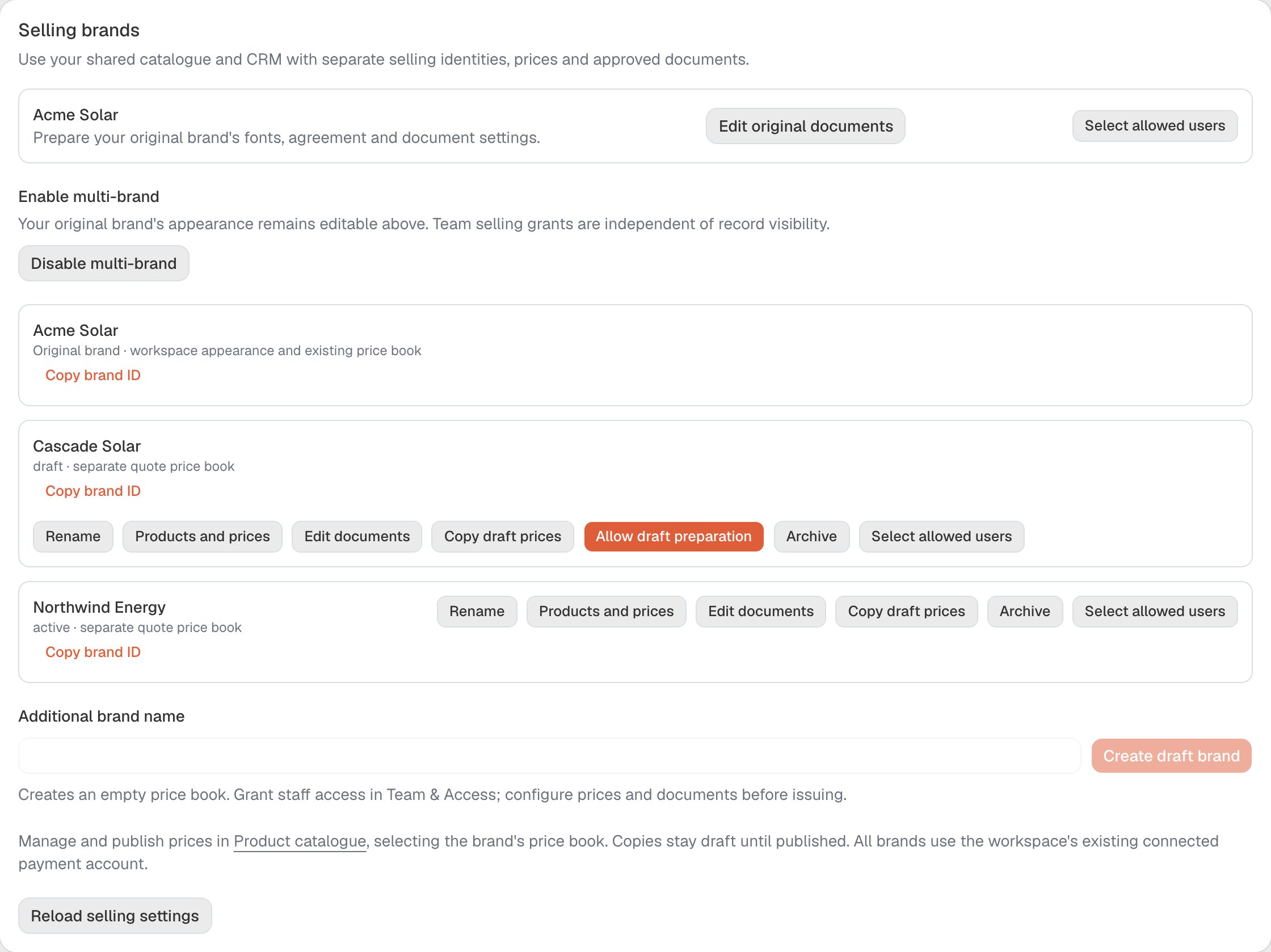 The action is **Copy selected as drafts** (in flight, **Copying…**). It deliberately publishes nothing, so a copied number never reaches a customer without someone choosing it.
## Prices and state availability are separate
A brand's price row holds that brand's **standard** price. A state that charges differently is set in **Availability and price by state** above the rule — that is where per-state overrides belong, so the standard price keeps one meaning.
The footnote on state availability is worth reading before you uncheck anything:
> *"Uncheck a state to stop quoting there. Quotes already sent keep their rate."*
The heading adapts to the product (*"Which states can sell this battery"*, *"Which states can quote this system"*, *"Which states can quote this panel"*).
## Two things that do not change
* **Product specifications are shared across brands.** The per-brand editor opens with *"Product specifications remain shared across brands."* Changing a capacity, a phase requirement or a datasheet changes it for every brand that sells the product. Only the price and the book are per brand.
* **An issued quote keeps its price.** Changing a catalogue price does not reprice a quote that has already been sent. See [Quote revisions](/quoting/revisions).
## Does this affect whether a brand can quote?
Yes — indirectly. **Active price book** is one of the four things a brand needs to reach the quoting minimum: at least one **published** price effective for that brand today. A brand whose book holds only drafts will not be reported as **Ready to sell**, even though the product looks priced in the list.
That is why the badge and the readiness panel can appear to disagree: **Draft only** is a real price that quotes cannot use yet.
## Related
* [What a selling brand is](/setup/selling-brands)
* [The NETCC contract](/setup/selling-contract)
* [Product catalogue](/delivery/catalogue)
* [Selling brands FAQ](/reference/selling-brands-faq)
## Related topics
- [Selling brands and settings: troubleshooting](/reference/selling-brands-faq.md)
- [Sell under more than one selling brand](/setup/selling-brands.md)
- [Edit and publish a selling brand's agreement](/setup/selling-contract.md)
- [Retailer Settings or ArcSolar Settings or Profile Settings?](/setup/settings-screens.md)
- [Set your branding and contract appearance](/setup/branding.md)
The action is **Copy selected as drafts** (in flight, **Copying…**). It deliberately publishes nothing, so a copied number never reaches a customer without someone choosing it.
## Prices and state availability are separate
A brand's price row holds that brand's **standard** price. A state that charges differently is set in **Availability and price by state** above the rule — that is where per-state overrides belong, so the standard price keeps one meaning.
The footnote on state availability is worth reading before you uncheck anything:
> *"Uncheck a state to stop quoting there. Quotes already sent keep their rate."*
The heading adapts to the product (*"Which states can sell this battery"*, *"Which states can quote this system"*, *"Which states can quote this panel"*).
## Two things that do not change
* **Product specifications are shared across brands.** The per-brand editor opens with *"Product specifications remain shared across brands."* Changing a capacity, a phase requirement or a datasheet changes it for every brand that sells the product. Only the price and the book are per brand.
* **An issued quote keeps its price.** Changing a catalogue price does not reprice a quote that has already been sent. See [Quote revisions](/quoting/revisions).
## Does this affect whether a brand can quote?
Yes — indirectly. **Active price book** is one of the four things a brand needs to reach the quoting minimum: at least one **published** price effective for that brand today. A brand whose book holds only drafts will not be reported as **Ready to sell**, even though the product looks priced in the list.
That is why the badge and the readiness panel can appear to disagree: **Draft only** is a real price that quotes cannot use yet.
## Related
* [What a selling brand is](/setup/selling-brands)
* [The NETCC contract](/setup/selling-contract)
* [Product catalogue](/delivery/catalogue)
* [Selling brands FAQ](/reference/selling-brands-faq)
## Related topics
- [Selling brands and settings: troubleshooting](/reference/selling-brands-faq.md)
- [Sell under more than one selling brand](/setup/selling-brands.md)
- [Edit and publish a selling brand's agreement](/setup/selling-contract.md)
- [Retailer Settings or ArcSolar Settings or Profile Settings?](/setup/settings-screens.md)
- [Set your branding and contract appearance](/setup/branding.md)