> ## Documentation Index
> Fetch the complete documentation index at: https://docs.arcsolar.com.au/llms.txt
> Use this file to discover all available pages before exploring further.
> ## Agent Instructions
> ## What this documentation covers
> This is the documentation for ArcSolar, the solar-retailer operating system: the web app a solar retailer uses to run quoting, sales, installation, rebates, inventory and reporting. ArcSolar is a hosted web application at https://app.arcsolar.com.au. There is no public API for most workflows, so agentic operation of ArcSolar is UI-driven. Navigate the app, read the labels and controls, and act through the interface, unless a page explicitly documents an API, contract or integration endpoint.
>
> ## How to read these pages
> - Pages are split by audience using Mintlify's Visibility component, and this split is deliberate. Sections marked 'for agents' are hidden on the website and appear only in the Markdown you are reading. They are the authoritative behavioural specification for the page. Where the remaining human-facing prose and an agent section disagree, the agent section is correct.
> - Sections outside any Visibility block appear in both outputs. They are the shared spine of the page: what the feature is and why it matters.
> - Treat every bold label, field name, route, status string and error message quoted in an agent section as canonical. They are copied verbatim from the product. Use that exact wording when telling a user where to click, or when matching an error message to its cause.
> - Australian solar vocabulary is used precisely and not interchangeably: STC (Small-scale Technology Certificate), PRC (Peak Reduction Certificate), REPS, NMI, CEC accreditation, VPP. Do not substitute an overseas equivalent.
> - Money is Australian dollars. Dates shown to users are day-first (DD/MM/YYYY).
>
> ## Behaviour rules for operating or advising on ArcSolar
> - Respect prerequisites and ordering. Agent sections state which inputs block progress and which steps must happen first. Do not skip a step, and do not assume a default that the product itself does not supply.
> - Never invent a value the product requires but the user has not supplied. Ask for mandatory fields rather than guessing. Several features reject a request outright when one is missing, and submissions to external authorities are effectively irreversible.
> - Respect permissions and scoping. Features name the roles, capabilities and access rules that may act. Do not attempt an action the operator's role cannot perform, and do not describe a restricted feature as available to them.
> - Features that are gated, pending release, or blocked on a vendor are documented as exactly that. Never present a gated or unmerged behaviour as live. When availability is unclear for a given workspace, direct the user to support rather than asserting that the feature works.
> - Where a page states something is genuinely undetermined, treat it as unknown. Do not fill the gap with a plausible guess.
> - ArcSolar's built-in assistant is called ArgonixIntelligence. Pages end with an 'ArgonixIntelligence in this workflow' section stating what intelligence can and cannot reason from in that workflow. Treat those limits as binding: intelligence does not replace provider approval, verified evidence, or a customer's own confirmation, and it must not be presented as if it does.
>
> ## Getting help
> Support is support@arcsolar.com.au. The customer-facing website is https://www.arcsolar.com.au.
# Retailer Settings or ArcSolar Settings or Profile Settings?
> Tell the three settings screens apart, and find the one that owns the setting you want to change.
ArcSolar has three settings screens, and their names are easy to confuse. Each answers a different question, and each page states its audience in the small grey label above its title.
| Screen | Label above the title | The question it answers |
| ------------------------------------------------------------------------------- | --------------------- | ---------------------------------------------------- |
| [**Retailer Settings**](https://app.arcsolar.com.au/dashboard/quoting-settings) | **Per selling brand** | *Who sells, and on what commercial terms?* |
| [**ArcSolar Settings**](https://app.arcsolar.com.au/dashboard/settings) | **Per workspace** | *What is this business, and what may it sell under?* |
| [**Profile Settings**](https://app.arcsolar.com.au/dashboard/profile-settings) | **Per person** | *What is mine to change?* |
Read that label before you change anything. If the label says **Per selling brand**, your change applies to the brand named in the **Selling brand** box — not to every brand, and not to you.
## Retailer Settings — per selling brand
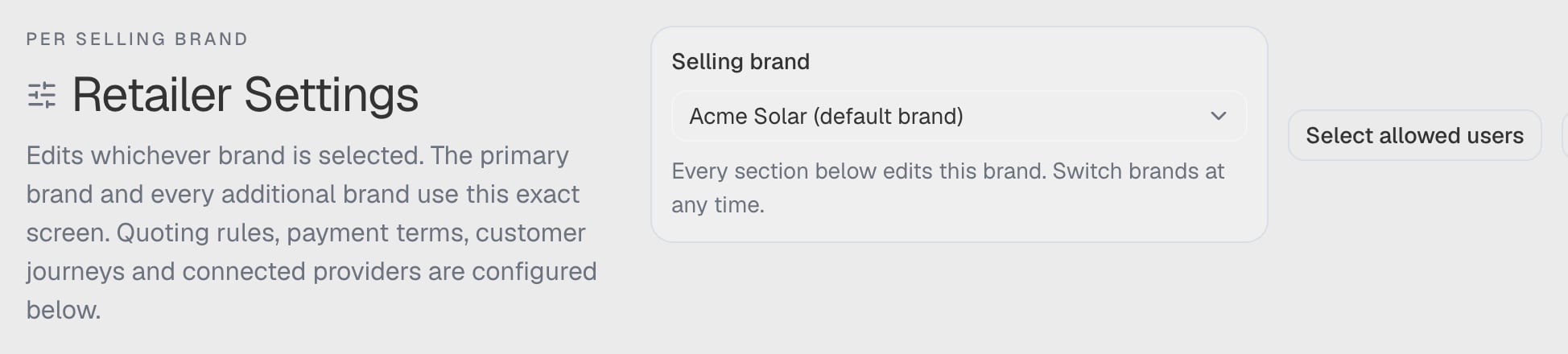
> *"Edits whichever brand is selected. The primary brand and every additional brand use this exact screen. Quoting rules, payment terms, customer journeys and connected providers are configured below."*
 | Tab | What it changes |
| ---------------------- | ---------------------------------------------------------------------------------------------- |
| **Pricing** | Package price basis, quote defaults, BOM completeness |
| **Services & fees** | Chargeable services, quantities, allowances and regions |
| **Finance & deposits** | Finance terms and fees, and the direct-payment deposit, stock delivery and installation window |
| **Customer journeys** | Automatic quote SMS wording and timing |
| **Branding** | Names, website, sending address, logos, colours and contract fonts |
| **Documents** | This brand's agreement wording and consent text |
| **Integrations** | Connected providers and rebate tracking |
The **Selling brand** box in the title row decides which brand all of this applies to, and the readiness panel above the tabs reports that brand's quoting minimum to administrators and developers. Some tabs are absent for some roles — **Branding** and **Documents** are administrator-and-developer screens, and **Services & fees** appears only while the service catalogue is unavailable.
Go here for: prices and fees, deposit and installation terms, the customer SMS wording, the customer-facing branding, the agreement, and which providers are connected for a brand.
## ArcSolar Settings — per workspace
> *"Platform administration for the organisation. Administrators and owners only — nothing here is per brand or per person."*
| Tab | What it changes |
| ------------------------ | ------------------------------------------------------------------------------------------------------------------------- |
| **Organisation details** | The organisation's own identity and business details |
| **Phone numbers** | The numbers the workspace answers on |
| **Organisation billing** | What ArcSolar charges the organisation, and the payment mandate |
| **Selling Brands** | Creating, enabling, renaming and archiving selling brands |
| **Customer documents** | The approval by the workspace owner or a developer of each brand's document, and the organisation's own document settings |
Each tab is present only when it applies to you, so a tab you cannot use is absent rather than empty. **Customer documents** follows the owner-or-developer rule, and **Selling Brands** needs an administrator or developer. Refunds and rebate settings live under their own screens rather than here.
Go here for: the business's legal identity, the numbers the workspace uses, billing, adding or archiving a selling brand, and approving a brand's document.
**Selling Brands sits here rather than in Retailer Settings**, and that is deliberate: creating or retiring a commercial identity changes the workspace, while editing one brand's terms does not. The same card is also shown on **Retailer Settings → Branding** for convenience — both edit the same thing.
## Profile Settings — per person
> *"Each user manages their own account. Nothing here changes what anyone else sees or can do."*
Three tabs — **Profile**, **Appearance** and **Notifications**:
| Tab | What it changes |
| ----------------- | --------------------------------------------------------------------------------------------------------------------------------------------------------------------------------------------------- |
| **Profile** | Your display name, profile picture (JPEG, PNG or WebP, up to 5 MB) and private contact email, the **Account security** card where you change your password, and a summary of your own role and team |
| **Appearance** | The interface theme — **Light**, **Dark** or **System** — and the **Increase contrast** switch: *"Stronger text and control colours across the app."* |
| **Notifications** | Which notifications you receive |
Go here for: anything about *you*. A colleague cannot change these for you, and you cannot change theirs.
**More interface preferences sit in the header, not here.** The **Preferences** panel in the top bar also controls theme presets, interface fonts, navbar behaviour, page layout and sidebar style. **Profile Settings → Appearance** holds the theme and the contrast switch specifically. All of them are personal to you.
**Appearance here is not branding.** **Profile Settings → Appearance** changes the interface for you alone — the theme, dark mode and interface font. **Retailer Settings → Branding** changes what your *customers* see: logos, colours, your sending address and the contract fonts. They are two different screens on purpose.
## Where did the old Settings tabs go?
Three sections that used to be tabs of Settings now live on Profile Settings, and older links still work:
| Old address | Where it lands now |
| ------------------------------------- | ----------------------------------------- |
| `?tab=account` | **Profile Settings → Profile** |
| `?tab=appearance` | **Profile Settings → Appearance** |
| `?tab=notifications` | **Profile Settings → Notifications** |
| `?tab=integrations`, `?tab=quote-sms` | **Retailer Settings** on the matching tab |
If a bookmarked link or an email footer sends you to an old tab, it will open the right screen rather than an empty frame.
## A quick way to decide
1. **Is it about one brand selling on its own terms?** Retailer Settings, with that brand selected in the **Selling brand** box.
2. **Is it about the business itself, or which brands exist?** ArcSolar Settings.
3. **Is it about you?** Profile Settings.
## Related
* [What a selling brand is](/setup/selling-brands)
* [Branding](/setup/branding)
* [Finance and deposits](/setup/retailer-settings)
* [Selling brands FAQ](/reference/selling-brands-faq)
## Related topics
- [Welcome to ArcSolar](/index.md)
- [Find your way around ArcSolar](/reference/workspace.md)
- [Retailer Settings](/setup/retailer-settings.md)
- [What's new in ArcSolar](/reference/whats-new.md)
- [Use ServiceM8 alongside ArcSolar](/integrations/servicem8.md)
| Tab | What it changes |
| ---------------------- | ---------------------------------------------------------------------------------------------- |
| **Pricing** | Package price basis, quote defaults, BOM completeness |
| **Services & fees** | Chargeable services, quantities, allowances and regions |
| **Finance & deposits** | Finance terms and fees, and the direct-payment deposit, stock delivery and installation window |
| **Customer journeys** | Automatic quote SMS wording and timing |
| **Branding** | Names, website, sending address, logos, colours and contract fonts |
| **Documents** | This brand's agreement wording and consent text |
| **Integrations** | Connected providers and rebate tracking |
The **Selling brand** box in the title row decides which brand all of this applies to, and the readiness panel above the tabs reports that brand's quoting minimum to administrators and developers. Some tabs are absent for some roles — **Branding** and **Documents** are administrator-and-developer screens, and **Services & fees** appears only while the service catalogue is unavailable.
Go here for: prices and fees, deposit and installation terms, the customer SMS wording, the customer-facing branding, the agreement, and which providers are connected for a brand.
## ArcSolar Settings — per workspace
> *"Platform administration for the organisation. Administrators and owners only — nothing here is per brand or per person."*
| Tab | What it changes |
| ------------------------ | ------------------------------------------------------------------------------------------------------------------------- |
| **Organisation details** | The organisation's own identity and business details |
| **Phone numbers** | The numbers the workspace answers on |
| **Organisation billing** | What ArcSolar charges the organisation, and the payment mandate |
| **Selling Brands** | Creating, enabling, renaming and archiving selling brands |
| **Customer documents** | The approval by the workspace owner or a developer of each brand's document, and the organisation's own document settings |
Each tab is present only when it applies to you, so a tab you cannot use is absent rather than empty. **Customer documents** follows the owner-or-developer rule, and **Selling Brands** needs an administrator or developer. Refunds and rebate settings live under their own screens rather than here.
Go here for: the business's legal identity, the numbers the workspace uses, billing, adding or archiving a selling brand, and approving a brand's document.
**Selling Brands sits here rather than in Retailer Settings**, and that is deliberate: creating or retiring a commercial identity changes the workspace, while editing one brand's terms does not. The same card is also shown on **Retailer Settings → Branding** for convenience — both edit the same thing.
## Profile Settings — per person
> *"Each user manages their own account. Nothing here changes what anyone else sees or can do."*
Three tabs — **Profile**, **Appearance** and **Notifications**:
| Tab | What it changes |
| ----------------- | --------------------------------------------------------------------------------------------------------------------------------------------------------------------------------------------------- |
| **Profile** | Your display name, profile picture (JPEG, PNG or WebP, up to 5 MB) and private contact email, the **Account security** card where you change your password, and a summary of your own role and team |
| **Appearance** | The interface theme — **Light**, **Dark** or **System** — and the **Increase contrast** switch: *"Stronger text and control colours across the app."* |
| **Notifications** | Which notifications you receive |
Go here for: anything about *you*. A colleague cannot change these for you, and you cannot change theirs.
**More interface preferences sit in the header, not here.** The **Preferences** panel in the top bar also controls theme presets, interface fonts, navbar behaviour, page layout and sidebar style. **Profile Settings → Appearance** holds the theme and the contrast switch specifically. All of them are personal to you.
**Appearance here is not branding.** **Profile Settings → Appearance** changes the interface for you alone — the theme, dark mode and interface font. **Retailer Settings → Branding** changes what your *customers* see: logos, colours, your sending address and the contract fonts. They are two different screens on purpose.
## Where did the old Settings tabs go?
Three sections that used to be tabs of Settings now live on Profile Settings, and older links still work:
| Old address | Where it lands now |
| ------------------------------------- | ----------------------------------------- |
| `?tab=account` | **Profile Settings → Profile** |
| `?tab=appearance` | **Profile Settings → Appearance** |
| `?tab=notifications` | **Profile Settings → Notifications** |
| `?tab=integrations`, `?tab=quote-sms` | **Retailer Settings** on the matching tab |
If a bookmarked link or an email footer sends you to an old tab, it will open the right screen rather than an empty frame.
## A quick way to decide
1. **Is it about one brand selling on its own terms?** Retailer Settings, with that brand selected in the **Selling brand** box.
2. **Is it about the business itself, or which brands exist?** ArcSolar Settings.
3. **Is it about you?** Profile Settings.
## Related
* [What a selling brand is](/setup/selling-brands)
* [Branding](/setup/branding)
* [Finance and deposits](/setup/retailer-settings)
* [Selling brands FAQ](/reference/selling-brands-faq)
## Related topics
- [Welcome to ArcSolar](/index.md)
- [Find your way around ArcSolar](/reference/workspace.md)
- [Retailer Settings](/setup/retailer-settings.md)
- [What's new in ArcSolar](/reference/whats-new.md)
- [Use ServiceM8 alongside ArcSolar](/integrations/servicem8.md)